
From 4,500 Discord messages to 200+ curated projects
How I built solve it project showcase

I was learning AI and coding by building small projects when I discovered Jeremy Howard's Solve It community. A group of builders solving problems with AI. The Discord had hundreds of active members sharing their work. New tools, experiments, and side projects appeared in the channels every day.
With over 4,500 messages, nothing stayed visible for long. Good projects got pushed down by new conversations within hours. I wondered if there was a way to collect and organize the best work so people could actually find it.
Manual Collection
I decided to start by just collecting what I could find. I began scrolling through the Discord channels to see what was actually there. When I spotted something that looked like an actual project, I'd copy down the details in a document - what it did, who made it, any links they shared. After hours of this, I had a list of 60 projects. I threw together a basic website with FastHTML and put a few of the projects on it. Johno brought it up in the next week's session.
The work was tedious, but it proved there were interesting things spread throughout all those conversations. I couldn't keep manually going through thousands more messages, though. I needed a different approach.
Automated Download
I wrote a Python script to download all the messages from the main channels - #chit-chat, #solvers, and a few others - and saved them as JSON files. Now I had all 4,500 messages on my computer instead of having to scroll through Discord.
But this created a bigger problem. Somewhere in those thousands of messages were the projects I wanted, mixed in with regular conversations, jokes, debugging requests, and everything else people talk about in Discord. I couldn't manually read through 4,500 messages - that would take weeks. I needed to figure out how to automatically identify which messages were actually about projects people had built.
Code and notes on how to retrieve tokens
AI Filtering
I decided to use Gemini API to help sort through the messages. I gave it two simple questions to ask about each message:
"Is this about a project or creation?"
"Did the poster actually build it?"
Based on the answers, messages went into three groups. If both answers were yes, it went straight into my projects list. If the AI wasn't sure about one of the answers, I'd review it myself later. If both were no, I'd ignore the message completely.
The tricky part was getting the AI to understand the difference between someone sharing their own work versus just linking to something cool they found online. There's a small difference between "I built this chatbot" and "Check out this cool project I found." for an AI to understand.
Two-Stage filtering
Going through 4,500 messages one by one would have taken forever and cost a fortune in API calls. I found that sending 10 messages at once in each request sped things up without affecting the quality, and kept me within rate limits.
Most messages weren't about projects at all - just regular Discord chat. Running everything through Gemini Pro (premium model) would be expensive and slow. So I used Gemini Flash (cheaper model) first for a quick, cheap pass through everything, flagging anything that might be project-related. Then I ran those flagged messages through Gemini Pro to identify the real projects, which saved me from manually reviewing hundreds of false positives.
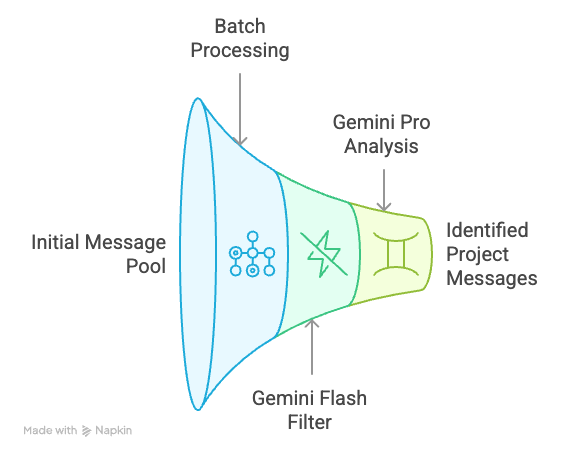
This two-step process got me through all 4,500 messages in about 500 API calls, staying under the free tier limits.
Now I had hundreds of messages labeled as projects, but they were all over the place. Some people wrote detailed explanations of what they built and how it worked. Others just dropped a link with "made this thing" and nothing else. I needed to turn these messy Discord posts into clean, consistent descriptions without losing what made each project interesting.
Standardizing Project Information
For this step, I used Gemini Pro since turning unstructured Discord posts into clean descriptions is more complex than just identifying projects. The AI needed to extract the key information from each post and organize it consistently.
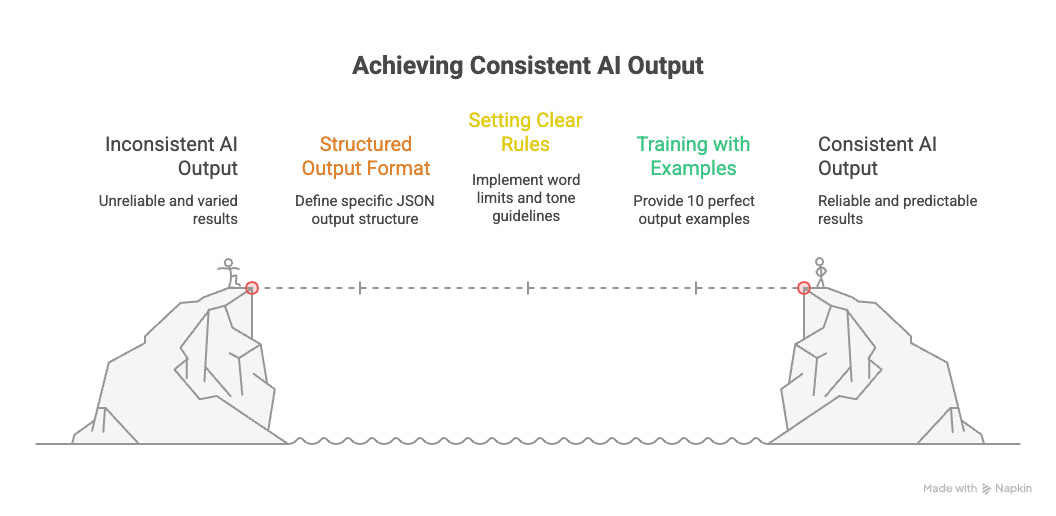
You can view the actual Prompts I have used here.
Structured Output
Instead of asking the AI to write whatever it wanted, I gave it a specific format to follow:
{
  "title": "What the project does, 5-10 words max",
  "description": "More detail about the purpose, 1-2 sentences max",
  "key_features": ["Feature 1", "Feature 2", "Feature 3"]
}
This forced the AI to be concise and consistent. The title had to explain the core function clearly. The description built on that with more context. The three features highlighted what made it useful or interesting. No rambling summaries or generic fluff.
Setting Clear Rules
Rules transformed the output:
Specific word limits forced conciseness, eliminated filler
No repetition between the title, description, and features - each part had to add something new.
Never use words like "project" or "solve it" since those were obvious from context
I also added specific instructions about tone, length limits, and what to avoid.
Training with Examples
I included 10 examples of perfect outputs in my prompt - just the clean JSON results I wanted. This gave the AI a clear target to aim for. Instead of explaining what good descriptions looked like, I just showed 10 examples of exactly the format and style I expected.
The first batch of results was promising but inconsistent. Some descriptions were spot-on, others missed the mark or added details that weren't in the original posts. I had the foundation of a working system, but I needed to make it more reliable.
I couldn't manually rewrite hundreds of descriptions - that would defeat the purpose of automation. But I also couldn't ship something full of errors. I needed to figure out how to get consistent results.
Making AI Reliable
At first, I just kept tweaking the prompt randomly, hoping each change would help. This was slow and unreliable. I'd fix one type of error and break something else.
Then I tried a different approach. Instead of running the AI on all 250 posts at once, I worked with small groups of 10-20 messages. For each batch:
Run the AI and see what it produced
Write down every mistake I found
Update the prompt to fix those specific problems
Run the same batch again to see if it improved
This let me see exactly what each change did. If a new rule fixed one problem but created another, I knew immediately.
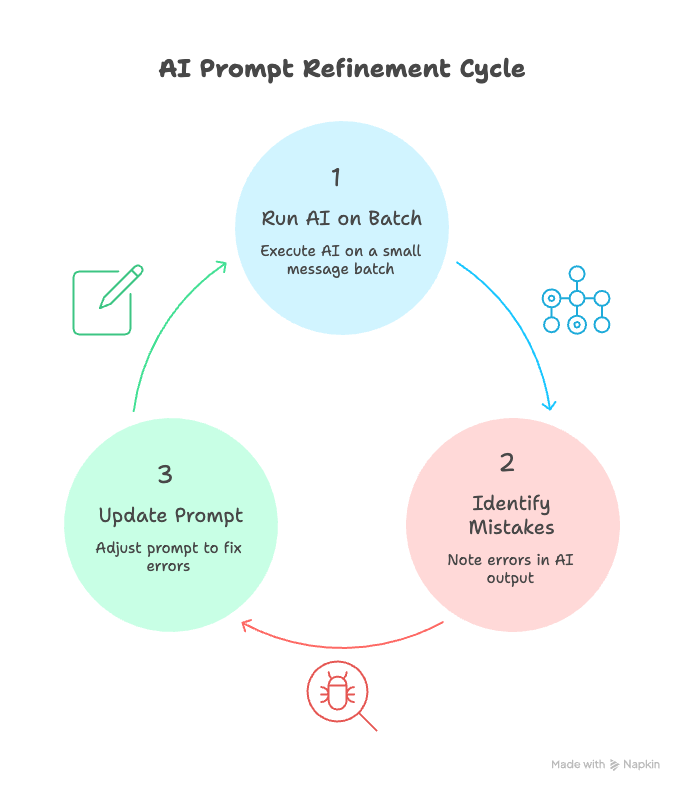
I wasn't expecting the perfect prompt to appear - I was building up a process that made prompts better through step by step improvement.
Building the Review Dashboard
Checking the AI's work was annoying. I had to jump between different files, copy and paste text, and try to remember which errors I'd already seen. The friction was slowing me down.
So, I built a simple dashboard to view all the items (input, output, errors, fixes) in a single interface.
It showed the original Discord message on one side and the AI's description on the other.
When I spotted an error, I could click a button to log what went wrong.
If something needed a quick fix, I could edit it right there without switching screens.
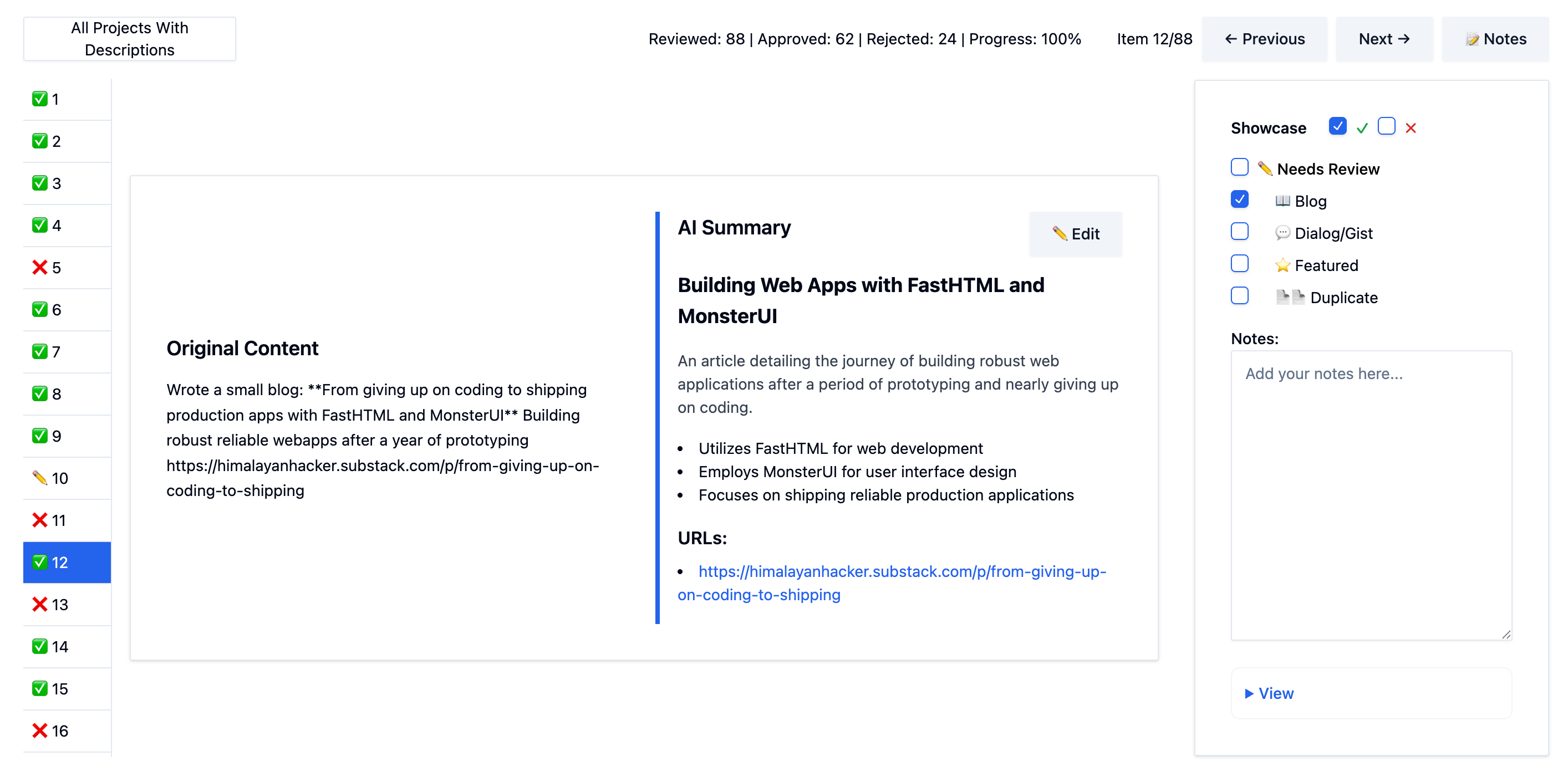
This made the review process much faster. Even when the AI made mistakes on the descriptions, I could fix them quickly enough that the final output was still accurate. What started as tedious error-checking became a smooth workflow.
Within a few iterations, I had fixed most of the common problems. The dashboard let me spot and correct any leftover errors quickly as I reviewed each batch.
Building the Website
With all the project descriptions cleaned up, I needed to turn them into an browsable gallery people could access. I used FastHTML since it's simple and fast - perfect for taking JSON data and turning it into web pages. The site shows each project as a card with the title, description, and key features I'd generated, plus the original author's name and any links they shared.
You can see the final result at solveit-project-showcase.pla.sh.
Too Much of a Good Thing
The showcase worked, but it created a new problem. Having 200+ projects made the collection look impressive, but it also made it hard to browse. People would visit the site, see dozens of projects, and not know where to start. The same thing that made it valuable - all that collected work - also made it overwhelming.
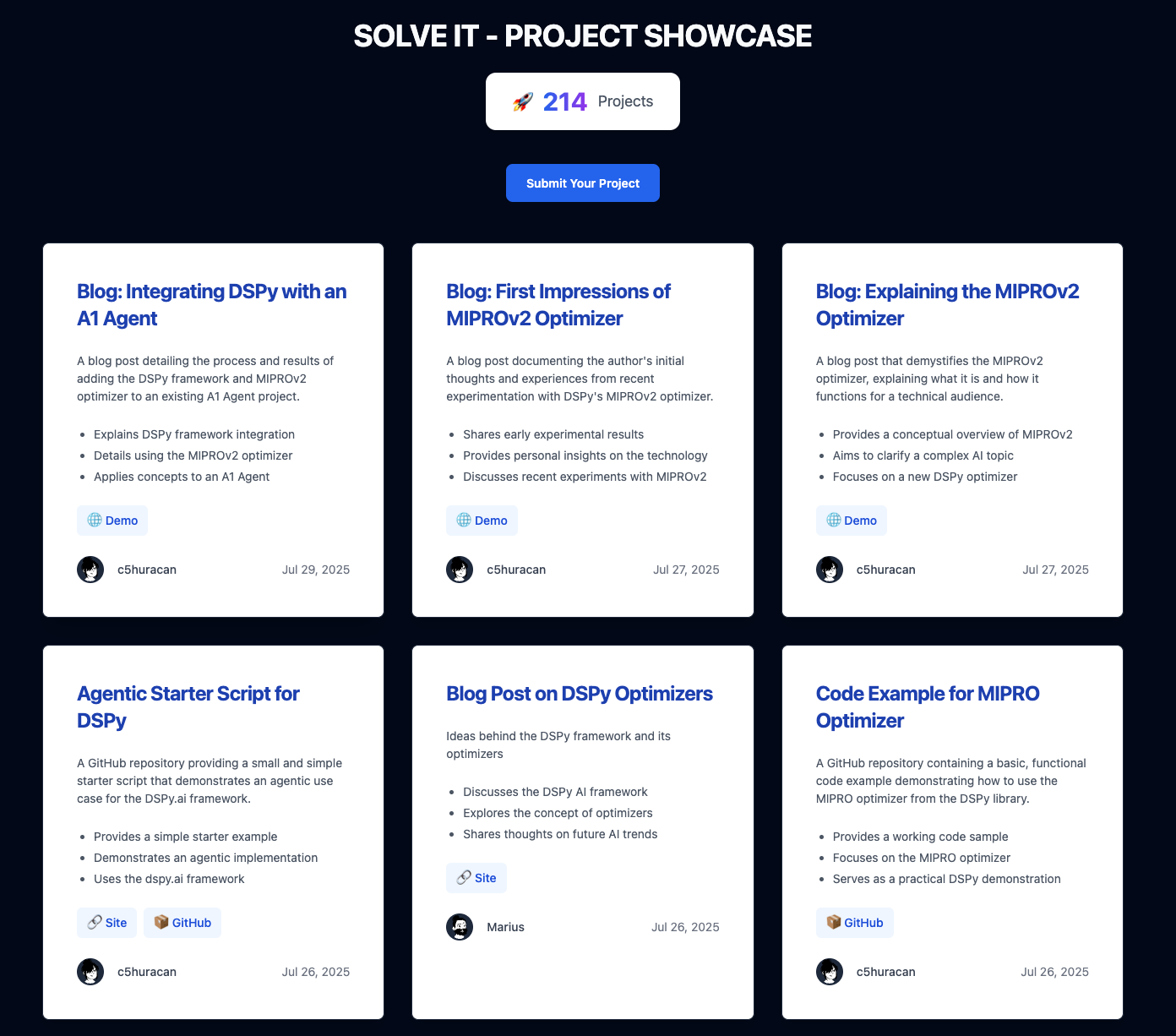
I still need to improve the UI and add search and filtering options so people can find projects by topic or type. That's next on my list.
What I Learned
This project taught me a few things about working with AI that I'll use next time:
Look at what's actually failing. I spent time randomly changing prompts and hoping they'd work better. Once I started testing small batches and writing down specific errors, I could see exactly what each change accomplished. The AI went from unreliable to dependable.
Build tools to remove friction. Building that review dashboard felt like a distraction at first - two days I could have spent on other features. But it eliminated all the friction from checking the AI's work.
Plan for humans, not around them. I originally wanted the AI to handle everything perfectly so I wouldn't need to review anything. That was the wrong goal. Instead, I made the review process so smooth that checking and fixing the AI's work became effortless.
The first version always sucks. Two weeks of debugging, inconsistent results, and wondering if this is even worthwhile. But now I know exactly how to approach the next project like this. The painful first attempt becomes the blueprint for doing it faster the next time.
Working on something similar?
I'm open to collaborating on projects, sharing what I've learned from this process, or discussing how these techniques might apply to your work. Whether it's partnership, consulting, or just bouncing ideas around, I'd love to hear from you. Reach out on LinkedIn.
Storybook
I was experimenting with Gemini Storybook by feeding the blog, and this is what it came up with. It was fun to read it. It’s not completely accurate, but it helped me structure this blog.
References
Partial code from last version (I will update it soon)
Credits
This project was built using Jeremy Howard's teachings called "Solve It" approach - breaking complex problems into manageable parts. If you want to learn what Solve it is and it’s approach, you can view the following video.
The systematic approach to AI evaluation came from Hamel Husain and Shreya Shankar's AI Evals course.
If you want to learn what Evals are, the field guide by Hamel will help.
Shreya's video Intro To Error Analysis: Creating Custom Data Annotation Apps shows the exact technique I adapted for building the review dashboard and doing systematic error analysis.
My writing process using AI is inspired by Isaac’s Process.